
Select the option that fits your workflow.
QXPMarkz for macOS (QuarkXPress to InDesign)

QXP to InDesign, QXP to IDML and more!
Take control of your creations with QXPMarkz®, Markzware’s next-generation QuarkXPress (QXP) conversion utility for macOS (Windows version also available).
Markzware’s legacy Q2ID InDesign plugin helped designers open and convert QuarkXPress documents directly in Adobe InDesign—without needing QuarkXPress installed. It saved time by preserving virtually all design elements, including:
• Anchored boxes, blends, and color models
• Fonts, text attributes, and styles
• Images, layers, and linked text boxes
• Page positioning, Pantone colors, tables, and runarounds
• And much more…
Now, that same trusted functionality—and far more—lives on in QXPMarkz, the standalone application that replaces Q2ID.
What QXPMarkz Can Do:
• Preview QuarkXPress documents before converting
Convert and export .QXP files to:
• InDesign (.indd)
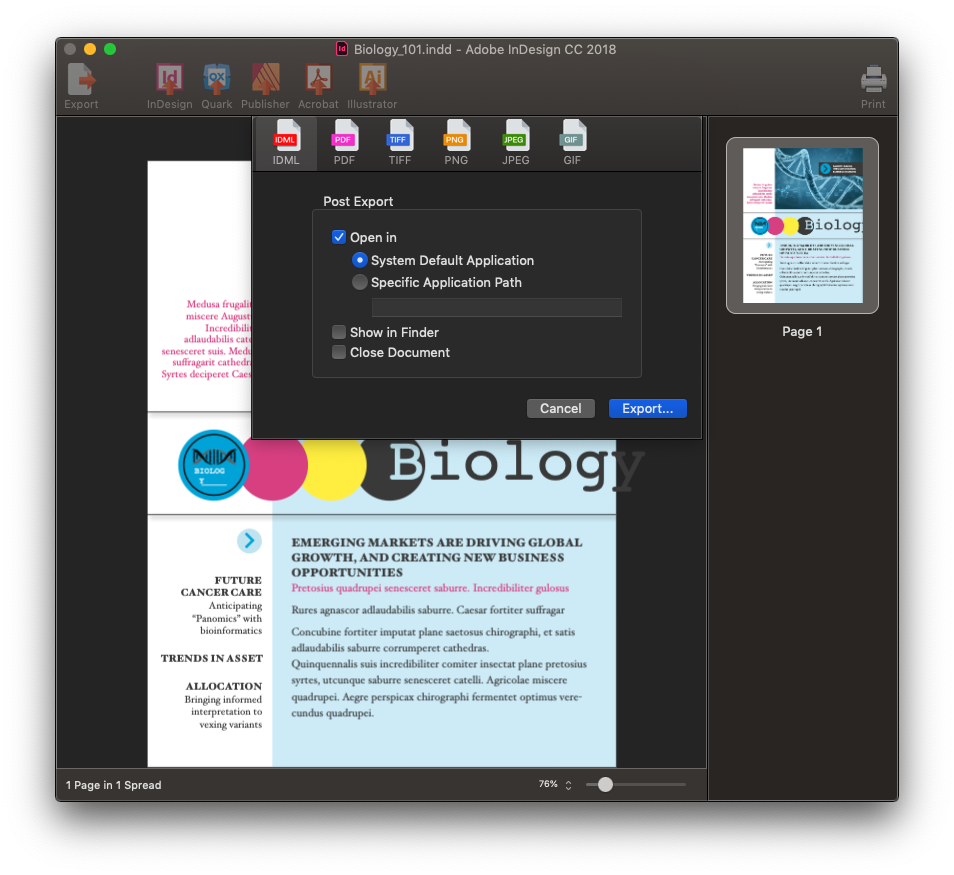
• IDML (for use in InDesign, Affinity Publisher, older Quark versions, and other DTP apps)
• PDF, PNG, TIFF, and more
• Automate conversions and integrate into your creative workflows
• Access MarkzPortal, Markzware’s cloud-based SaaS solution for online DTP file conversion
• Enjoy fast, flexible, modern file handling—without needing InDesign or QuarkXPress installed

Designers who relied on Q2ID for decades can now upgrade to QXPMarkz for more versatility, more speed, and complete independence from plugins.

If you’re modernizing your workflow or reviving archived PDF projects, QXPMarkz is the essential upgrade.
[Buy, Get Quantity Discounts, or Try QXPMarkz for macOS Now]


Adobe InDesign
CS4 or newer

Affinity Publisher
v1.8 or newer

Affinity

Adobe
Acrobat

Adobe
Illustrator

Many Others
Often, users have expressed that they need a quick QuarkXPress previewer, not always a full-blown editor. Some have owned QuarkXPress, others occasionally receive QXP files from colleagues. We now announce a fast and affordable solution!
The previews are based on internal document data and are representative of the original document. Text is crisp and zoomable.

[Buy, Get Quantity Discounts, or Try QXPMarkz for macOS Now]

IDML


JPEG

PNG

TIFF

GIF

TXT

RTF

HTML
QXPMarkz enables you to export QuarkXPress files to numerous non-proprietary file types, including IDML, PDF, JPEG, PNG, TIFF, GIF, TXT, RTF and HTML. You can also open .QXP files in an earlier version of QuarkXPress or in another application! If you need to export to JSON, check out OmniMarkz!


QXPMarkz is a cutting-edge solution that revolutionizes content extraction and conversion from unstructured formats. It empowers you to effortlessly extract and convert content from QuarkXPress (QXP) and other unstructured formats into structured formats like JSON, XML, and IDML, unlocking the true value of your content.
QXPMarkz allows you to extract QuarkXPress text stories as RTF, HTML, or plain text (TXT), while preserving the original text formatting, making seamless conversion easier than ever.
Unlock new avenues for revenue growth by recycling your content for a competitive advantage. Leverage vector databases and large language models (LLMs) to streamline your workflow, making it more sustainable and efficient.
[Buy, Get Quantity Discounts, or Try QXPMarkz for macOS Now]
 Preview QuarkXPress files
 No exporting No Open in … No annotatable PDFs Preview QuarkXPress files Export as IDML, PDF, and more Open in InDesign, Publisher, and more Export annotatable PDFs 12 months of updates included Preview QuarkXPress files Export as IDML, PDF, and more Open in InDesign, Publisher, and more Export annotatable PDFs Optional Upgrade charges may apply
Take me to QXPMarkz SE for Windows
What is the difference between Perpetual and Subscription Licenses
[Take Me To The Products Page]
Further simplify the process, by configuring the Automation Preferences, to automatically export and open the file, in your chosen application. Double click a QXP file, in Finder, and the document will open in InDesign, Affinity Publisher, an older version of QuarkXPress*, or another application of your choice.


With Automation Preferences, AppleScript support and a Custom URL Scheme, QXPMarkz will have no problem integrating into most automated workflows.

[Buy, Get Quantity Discounts, or Try QXPMarkz for macOS Now]

Users who are familiar with our Q2ID InDesign Plug-Ins appreciate the ease of converting QuarkXPress documents, directly, within InDesign. QXPMarkz comes with the same type of integration, allowing users to choose “Open QuarkXPress File…” right from the InDesign File menu. The selected document will be converted by QXPMarkz and opened in InDesign, automating the entire QuarkXPress-to-InDesign file conversion process.
QXPImport Script Video Tutorial

The document inspector view gives a high-level document summary, with file type, version, size, creation date, modification date, page count, spread count, page size, font, color, and image data.
Markzware has long been known for our conversion plug-ins and XTensions, but we’ve outdone ourselves, with a standalone QuarkXPress conversion and preview application. With over three decades of software development experience in the preview and conversion of Desktop Publishing files, Markzware offers a standalone app, to help you more easily process QuarkXPress files in today’s DTP workflows.
[Buy, Get Quantity Discounts, or Try QXPMarkz for macOS Now]
You can get a download that lets you use the QXPMarkz preview feature, for free! This freebie is a great tool for viewing QuarkXPress documents, at no cost. The exporting features can be enabled at any time, with the purchase of a license.


QXPMarkz is designed to make complex tasks quick and easy. Preview your document, then, with a single click, open the file in InDesign, Affinity Publisher, an older version of QuarkXPress* (2017 or newer), other pre-defined applications, or define your own destination application.




A few years ago we made a business decision to migrate from QXP to ID … QXPMarkz has been invaluable for us; we have been able to gradually migrate documents over to ID with very little complication, so the client has been happy and so have we.
– Diarmid Langley, Senior Designer, Breckinridge – The Growth Agency

Annually publishing a PRICED 768-page catalog with approximately 17,000 prices, when the linkage app for Quark was at its end of life, changing to InDesign was essential. QXPMarkz conversion is extremely easy and accurate.
– Bernie Maopolski, Graphics,
W.D Armstrong

This software works just as it’s billed! Opens up QuarkXPress files with ease and very little tweaking needed. I was pleasantly surprised when I began working with this tool. … Highly recommended to anyone wanting to make the switch.
– Jean Drew, Production Manager,
Vilas County News-Review
Submit your review | |
Love your QXPMarkz! it has saved me many times as we are updating our many manuals from QuarkXpress to InDesign. What a time saver!
I am also impressed with Mark Singelyn, who was so very helpful recently with problems renewing my yearly subscription that were caused by my company credit card. He was so kind and professional, going out of his way to make sure everything worked out. It is always wonderful to meet a a customer service person who truly cares about his job and the people he helps. Mark is an example of what Customer Service should be like.
I let myself work for too long on the reliable QuarkXpress 9 and when my computer died the Markzware application was nothing short of miraculous for me to recover files I thought would be gone forever. Thank you!
We've saved so much time and money by successfully converting our QuarkXpress documents to InDesign rather than rebuilding file. The program works exactly as promised. And for us, the best part is the customer service. Unlike any other software vendor anymore, there's a real person to help us when we've had questions. Mark Singelyn, our contact at Markzware, has been amazing. You just don't find personalized service like this anywhere else. Highly recommend Markzware!
Having been in the book design business for over 30 years, we've moved from PageMaker to QuarkXPress to InDesign. Many times clients will want to update their books, but they're in Quark and we no longer have the ability to work on the files. With QXPMarkz and two minutes, we can open those old files in InDesign and get started. I'm astonished each time we do a conversion. It's like magic! We are a very happy customer.
I found QXPMarkz very, very easy to use – and it did exactly what it promised to do. I was very impressed!
It meant that I no longer had to mourn the end of Quark Xpress - or not quite so much anyway....!
We’ve been thoroughly impressed with QXPMarkz. It’s transformed how we handle QuarkXPress files—seamlessly converting them into InDesign, Affinity Publisher, and even older Quark versions. The app is reliable, fast, and incredibly intuitive. It’s now an essential part of our Mac-based workflow, and we’re genuinely pleased to have such a powerful tool at our fingertips.
I have been using QXPMarkz for several years now to my complete satisfaction. Without this program, I would not have been able to convert QXP documents to InDesign and would have had to laboriously reprocess them, which would have been time-consuming and expensive.
I also use QXPMarkz to convert older QXP documents that can no longer be opened in QuarkXPress, because they are from 1996 and are beautiful children‘s books that are always edited and republished after a long time.
All time I have been using QXPMarkz, I have only had 2 cases where the document could not be opened, but I have successfully converted 99% of the times.
Converts Quark documents very quickly and without any issues on all files needed to date. Mac Quark files to indesign on windows worked a dream. We are running indesign latest version and converting mainly Mac OS Quark 9.0 I believe.
One of my clients wanted to update some older 2004 books that I had done in Quark which I no longer use and had never updated. With QXPMarkz I was able to completely open them in InDesign. The files are completely functional now in InDesign with total editing ability. It’s like magic! Without this program, the book would have had to be totally recreated; a long and tedious job.
We have a number of clients that have been working with us for almost 20 years and every now and then they ask us to revive a old Quark Xpress packaging design or artwork going wayyyyy back.
Often it's just a little tweak to say the ingredients or having to add a safety mark. So being able to use QXPMarkz to resurrect the old document into indesign rather than having to recreate makes a massive difference for us and the client in terms of time and money.
[Buy, Get Quantity Discounts, or Try QXPMarkz for macOS Now]

macOS • 27 Golden Gate | Hardware • Mac Pro, iMac, iMac Pro, MacBook, MacBook Pro, MacBook Air, Mac Mini |
Take me to QXPMarkz SE for Windows
*QuarkXPress 2017 or newer is required to open the exported IDML file. [Direct InDesign IDML Import in QuarkXPress]
[Buy, Get Quantity Discounts, or Try QXPMarkz for macOS Now]
QXPMarkz for macOS
(QuarkXPress to Adobe InDesign, Affinity Publisher,
older QuarkXPress, Acrobat, Illustrator & More)

